
Claiming payment#
Important
We expect most students will claim via the Temporary Staffing Service (TSS) route. Assume this it is this method unless told explicitly otherwise.
JGI Admin Contact#
For any queries regarding payment claims, timesheets or related matters, please contact Joanne Norris ✉️ from the JGI admin team. If Joanne is unavailable, please contact the JGI admin team✉️.
Temporary Staffing Service (TSS) Claims#
To claim for hours worked, Ask-JGI team members will need to ensure that their timesheet is up to date before the end of each month. We will send a reminder in the Microsoft Teams channel with the exact deadline each month. Once checked, the JGI admin team will then submit your total hours to University HR for payment.
Information on this process can be found on the CAG SharePoint.
TSS timesheet process for those claiming hours#
Ask-JGI individual timesheets and be in the Timesheets.25-26 sharepoint folder. Each time member will only be able to access the their one timesheet.
Those on TIER 4 visa’s will also have a TSS timesheet provided to them by the TSS service. This is a weekly timesheet, and hours cannot be amended in previous weeks. Hence sometimes, there may be a discrepancy between your JGI and TSS timesheet. This is fine. Joanne has access to both and will always claim your most recently updated hours.
Submission deadline: 26th of each month
Complete your timesheet with your most up to date hours by the 26th of the month
If you worked hours in the previous month that you didn’t claim for, include them in the current month’s timesheet (e.g you claimed for 16 hours but worked 18. Claim an extra two hours in the current timesheet).
If you know you are going to work past the 26th (e.g. 27th, 28th, 29th, etc) include these expected hours on the current timesheet
Things to complete on the timesheet:
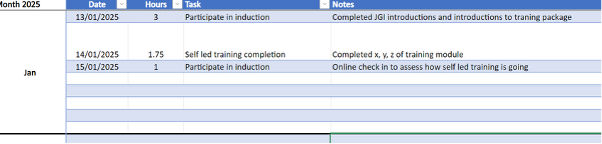
Each time you work, insert the date, the hours that you worked and what you worked on into the ‘timesheet’ sheet.
Warning
Record hours as the decimal notation (1hr = 1. , 30 minutes = 0.5. 45 minutes = 0.75, etc)
The hours you record should automatically populate the total hours in the ‘totals’ sheet.
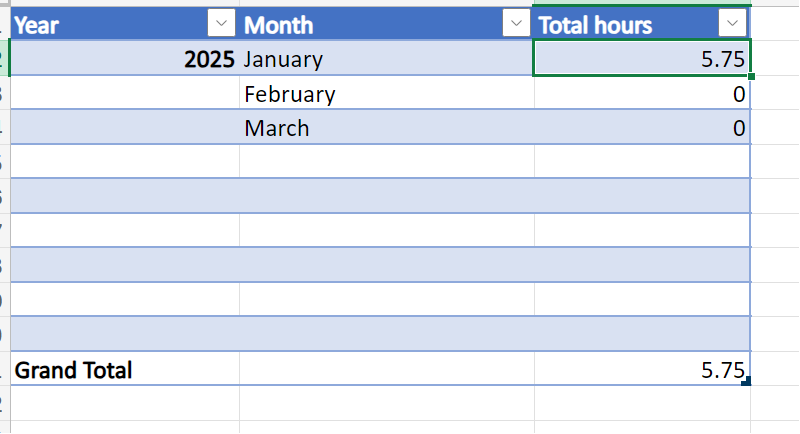
Please check that this function is working as often I will just come to this section of the spreadsheet and not check the individual hours in the ‘timesheet’ sheet. Hence if it’s not populating with the correct hours, you may get paid incorrectly.
TSS pay a month in lie. That means that if you submit hours at the end January, you will get paid for these hours at the end of February.
The JGI admin team will send out an email around the 24th to remind people to complete timesheets.
Staff Fee Claims#
In cases where a student is already a staff member at the University, a payment route has already been set up through HR. This means that hours worked on Ask-JGI must be claimed by the student through MyERP using a Staff Fee Claim form.
Guidance for making payment claims in this way can be found on the Claiming Staff Fees SharePoint.